How to Get Better Audio Streaming Quality in 2026

Table of Contents
Better audio quality is rarely just one setting. Most stream issues come from a mismatch between your encoder settings, your source audio, and your listeners’ connection quality. This guide gives you practical settings you can use right away for internet radio in 2026.
If you are new to internet radio, start with our step-by-step station launch guide, then come back here to optimize your sound.
What Controls Audio Streaming Quality?
For live radio streams, quality is the combination of bitrate, sample rate, channel mode (mono vs stereo), and clean source audio. Think of these four as one system: if one part is weak, listeners hear it immediately.
- Bitrate (kbps): How much audio data is sent per second. Higher usually sounds better, but requires more bandwidth.
- Sample rate (Hz): How many audio samples are taken per second (common values: 44.1 kHz, 48 kHz).
- Channels: Mono uses one channel; stereo uses two. Stereo feels wider, mono can sound cleaner at lower bitrates.
- Source quality: Bad mic gain, clipping, or noisy routing will ruin quality even at high bitrates.
Recommended Encoder Presets (Good Starting Points)
Use these as practical baseline presets, then adjust based on your audience and bandwidth limits:
| Use Case | Codec | Bitrate | Sample Rate | Channels |
|---|---|---|---|---|
| Talk radio / podcast style | MP3 | 64 kbps | 44.1 kHz | Mono |
| Mixed content (talk + music) | MP3 | 96-128 kbps | 44.1 kHz | Stereo |
| Music-first station | MP3 or AAC+ | 128-192 kbps | 44.1 or 48 kHz | Stereo |
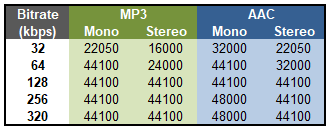
Mono vs Stereo: Which One Should You Use?
Stereo is not always better. At lower bitrates, stereo splits the available data between two channels and can sound thin or swishy. If your stream is voice-heavy or bandwidth-limited, mono often sounds cleaner and more consistent.
- Choose mono when you stream mostly speech, interviews, or sermons at low bitrates.
- Choose stereo when music quality and spatial detail are important, and your bitrate supports it.
7 Practical Fixes That Improve Stream Quality Fast
- Match encoder bitrate to your plan: Do not exceed your stream profile limits.
- Use stable input gain: Keep peaks below clipping and avoid redlining your mixer/interface.
- Pick one sample rate and stick to it: Repeated sample-rate conversion can degrade clarity.
- Use wired internet when possible: Ethernet reduces packet loss and dropouts compared with Wi-Fi.
- Choose the right channel mode: Voice formats usually benefit from mono at lower bitrates.
- Check your processing chain: Over-compression, aggressive EQ, and limiters can create listener fatigue.
- Monitor from a second device: Always listen like a real user (mobile + headphones is ideal).
If you need help with live source setup, see our BUTT encoder setup guide and AutoDJ to live source transition guide.
Troubleshooting Common Audio Quality Problems
- Audio sounds distorted: Lower your input gain and disable duplicate audio processing plugins.
- Audio sounds muffled: Check low sample rate settings and verify your source files are not low quality.
- Audio cuts in and out: Test a wired connection and reduce encoder bitrate slightly to stabilize.
- Left/right balance feels wrong: Confirm interface channel routing and mono/stereo settings.
Need a full setup walkthrough? Read our Icecast setup guide and what you need to stream live checklist.
Related Articles
What is the best bitrate for internet radio streaming?
For many stations, 128 kbps MP3 stereo is a strong general-purpose starting point. Talk-focused stations can often run well at 64 kbps mono.
Is mono better than stereo for low bitrate streams?
Usually, yes. At lower bitrates, mono often sounds clearer for speech because all available data goes into one channel.
Why does my stream sound bad even at high bitrate?
High bitrate cannot fix poor source audio, clipping, bad gain staging, or unstable network conditions. Clean source and stable routing matter just as much.
How can I reduce buffering and audio dropouts?
Use a wired connection when possible, keep encoder settings within your server limits, and lower bitrate slightly if your upload connection is unstable.
Ready to improve your stream and launch with confidence? Click here to see our plans.

 Home
Home